|
1. Go to the group site at
i.e. http://groups.yahoo.com/group/uncleanedcoins/
or http://groups.yahoo.com/group/moneta-l/
or http://groups.yahoo.com/group/coinsgreek/
or http://groups.yahoo.com/group/romanprovincialcoins/
or http://groups.yahoo.com/group/ancientattribution/
and click on Sign In
I'm a member of these groups aswell.
If you are not a member JOIN US!!
|
|
2. Enter your yahoogroups username and password
and click on Sign in
|
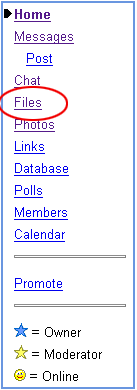
3. Being signed in now, click on Files on the left hand side
|
|
4. You are now in the Files section of the group:
If you have a coin to ID, click on the 000_ID folder
If there is no such 000_ID folder,
create one by clicking on Create folder!!!
|
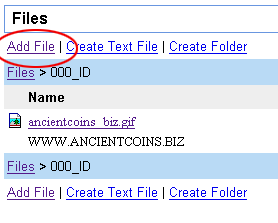
5. Now being in the appropriate folder for coin to be ID'd,
click on Add file
|
|
6. Uploading the file:
1. Click on Browse... and select a file located on your local harddisk.
2. Type in a description: In any case the diameter (helps people to ID the coin) and the weight if you have a precision scale
3. Check the checkbox to send the group a mail announcing your upload (then you don't have to send the URL of the file seperately).
4. Click on Upload File to upload the file to the yahoo server
|
|
7. VOILA :-) the image is on the yahoo server and everyone can see it.
|
8. Click on the image to see it.
If you didn't check the checkbox at the upload-page (see 6.) you can now copy and paste the URL in the browsers location bar at the top of your screen into your own mail to the group. |



